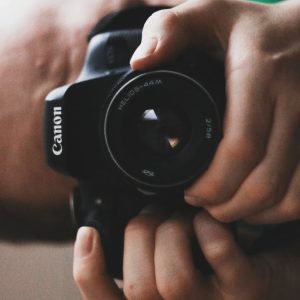
For the past few weeks, I’ve been using my Dad’s old Zenit vintage lenses with my DSLR. He hasn’t used them for years, mainly because his Zenit SLR is a 35mm film camera, and using film is costly compared to digital.
But his lenses are in good condition, one is a Helios 44M Prime lens good for bokeh shots, while the other is a Photax 200mm telephoto lens – also a Prime lens with a fixed focal length.
However, such a feat wouldn’t have been possible without an M42-EOS adaptor, which converts the M42 screw-fitting to my DSLR which has a bayonet fitting. The adaptors are useful, and in my case, relatively cheap. Mine cost £8 FROM Amazon and also offers the AF-confirm function, which is useful for focusing on a subject with Manual Focus.
And by the way, to use a vintage M42 lens, I have to use fully Manual modes. Which I do anyway. Even since getting my DSLR two years ago, I’ve never used any of the Auto modes.
Manual is the only way to use a vintage lens, because there’s no way of controlling the lens aperture or focus via the camera body (only the shutter speed can be altered on the camera), so alterations to the aperture and focus have to be done on the lenses themselves.
I’ve set my camera to it’s maximum aperture, f/1.4, so the camera knows not to under-exposure via its image processing algorithms.
I’ve also found that my vintage lenses produce slightly pale-looking photos, but this is easily corrected via the White Balance settings on my DSLR.
I’ll be sharing my photos and notes on my Instagram and also my photo blog, Chris JK DSLR, so please do check these out.
Over and out,
-Chris JK.


